Why the Final Price at Checkout Is Different from What You Saw
About this guide
The SulitScan editorial team prepares buyer guides using desk-researched product information, primary guidance where available, and practical pre-purchase checks. We do not claim hands-on testing unless an article explicitly says a product was tested.
In this guide
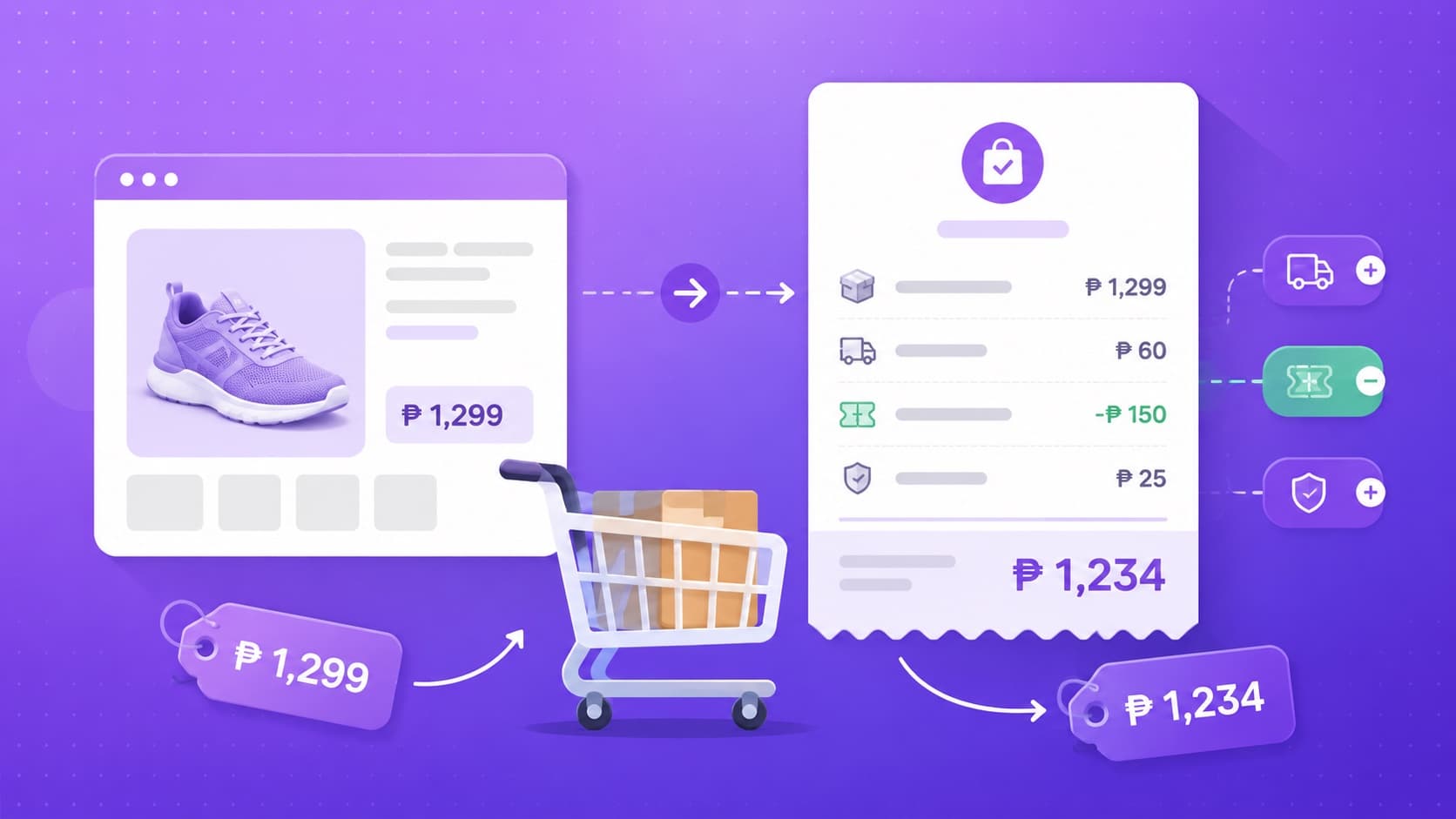
You found a deal. The product page shows ₱299. You add it to cart, go to checkout, and it shows ₱420. What happened?
Price differences between deal listings and checkout are common across all online shopping platforms, including Temu and Sephora PH. This guide explains the most common reasons, and what you can do to avoid unpleasant surprises.
What's in This Guide
- Why checkout prices differ from listing prices
- The specific cases for Temu and Sephora PH
- What SulitScan does about price accuracy
- How to check the final price before committing
- Your final pre-purchase checklist
- FAQ
Common Reasons for Checkout Price Differences
1. Shipping fees added
The product price may not include shipping. For Temu, most orders include free shipping, but some items (particularly lightweight or very-low-price single items) may have a shipping fee. The shipping cost is added at checkout, not shown on the product listing.
For Sephora PH, free shipping applies to orders ₱1,500 and above. Below that threshold, a shipping fee is added at checkout.
2. Voucher not applied
If you saw a deal price after a voucher was applied in a screenshot, post, or deal listing, but you didn't apply the same voucher yourself at checkout, you'll pay the pre-voucher price.
Always check the Promotions or Vouchers section at checkout before confirming. Don't assume a discount is already applied to the listed price.
3. Price changed since the deal was listed
This is the most common reason for differences between SulitScan's listed price and the checkout price. Prices on Temu and Sephora PH can change daily, sometimes hourly during sale events.
SulitScan sources prices from affiliate datafeeds at the time we add or update a deal. We cannot guarantee the price is still the same when you click through to the partner store. This is why every deal card on SulitScan includes a "last checked" date and a reminder to confirm the final price on the partner store.
4. Variant pricing
The price shown may be for a specific color, size, or quantity. If you select a different variant, a larger size, a different color, a different quantity, the price updates to that variant's price.
Always confirm the price updates correctly after selecting your specific variant before proceeding to checkout.
5. Tax or VAT added at checkout
Some platforms display prices exclusive of taxes on product pages, then add VAT at checkout. This is more common on platforms operating in certain markets. Check if tax is added at checkout on the platform you're using.
6. Exchange rate fluctuation
If you're paying through a credit card in a currency other than Philippine Peso, your bank's exchange rate and any foreign transaction fees will affect your final billed amount. This applies to international platforms like Temu.
7. Minimum quantity requirements
Some Temu products have a minimum order quantity (e.g., "pack of 5" or "set of 3"). If the listed price is per item but the minimum order is a pack, the total at checkout will be for the pack, not the single item.
Temu-Specific Price Notes
- Temu's listed price on product pages is usually the pre-shipping price
- First-time buyer discounts are applied at checkout, not on the product page
- Bundled or multi-quantity discounts apply when you add the required quantity
- Flash sale prices are time-limited, if you delay, the price may revert
Sephora PH-Specific Price Notes
- Sephora PH shows product prices inclusive of VAT
- Shipping is free for orders ₱1,500 and above; below that, a shipping fee applies
- Beauty Rewards point redemptions are applied at checkout
- Brand promo codes and platform vouchers are entered at checkout, they don't automatically appear in the cart
What SulitScan Does
We add a "last checked" timestamp to every deal. We include a price disclaimer reminding you that prices may differ from what we list. And we include a buyer checklist on every deal detail page, the first item is always to confirm the current price on the partner store.
We are a small, manual operation. Prices in our datafeed update periodically but are not real-time. The best use of SulitScan is as a discovery tool, find deals here, then confirm the price and details on the partner store before buying.
How to Check the Final Price Before Committing
If you are choosing between stores or sellers, use our tool to compare two checkout totals. It includes quantity, shipping, vouchers, payment discounts, other fees, and an optional import-cost estimate, then shows the final and per-unit cost for each offer.
- Click through to the partner store from the deal card or detail page
- Select the specific variant you want (size, color, quantity)
- Add to cart
- Check the cart total, this is the pre-checkout price
- At checkout: check for available vouchers and apply them
- Review the order total on the payment page, this includes shipping and any taxes
- Only confirm the order when you're satisfied with the total
Your Final Pre-Purchase Checklist
- Does the checkout price match your budget?
- Has shipping been added? Is it still within budget?
- Did you apply any available vouchers or loyalty points?
- Is the variant (size, color, quantity) correct?
- Is the delivery estimate acceptable?
- Do you understand the return policy if the item doesn't meet expectations?
If any of these don't look right, step back. There's no urgency. Good deals come back.
FAQ
Q: SulitScan showed ₱299 but the product is now ₱450 on Temu. What happened? Prices change after we update our listings. Our datafeed prices are not real-time. Always confirm on the partner store before buying. If you see a significant difference, use the "Report outdated price" link on the deal page.
Q: Can I lock in a price by adding to cart? On most platforms, adding to cart does not lock in a price. The price at checkout is the current price at the time you complete the order. Cart prices can change.
Q: What's the best way to avoid checkout price surprises? Go all the way to the payment confirmation page before finalizing. Review the itemized total, product price, shipping, taxes, and any discounts applied, before entering payment details.
Q: Is the checkout price fixed after I confirm the order? The charged order total is recorded when you confirm, and a later price drop does not automatically change it. A platform may offer a separate conditional remedy. For Temu, check the live order against our returns, refunds, and price-adjustment guide.
Q: What if I notice the wrong price was charged after payment? Contact the platform's customer support with your order details. Keep all order confirmations and receipts. Most platforms have a process for billing dispute resolution.
Related on SulitScan
Read our guide on how to spot fake discounts, use the Shopee voucher-stacking workflow for cap and minimum-spend math, and finish with our voucher and shipping checklist. Browse current deals on SulitScan.
Affiliate Disclosure
SulitScan may earn a commission when you click partner links and complete a purchase. This does not affect your price. See our full Affiliate Disclosure.
Tags
Get weekly sulit finds in your inbox
Shopping tips, price-check reminders, and the best deals, free.
More shopping guides


Explore SulitScan